ThinkPad USB-C power recognition and charging
Open task Compare the direct Lenovo power path before a dock, adapter or battery decision.
Service handoff pack · ThinkPad T14 Gen 2 Intel
Combine adapter configuration, AC recognition and Lenovo diagnostic results for an exact-machine service request.
Planning estimate for assembling existing evidence; excludes testing, backup and service.
Enable JavaScript to record observations. The complete preparation guide is available below.
Save observations in each relevant task. Return here to include their records in one export; untouched tasks remain “not started”.
Compare the direct Lenovo power path before a dock, adapter or battery decision.
Keep an official hardware-scan result tied to the component and symptom actually checked.
Combine verified backup coverage, private recovery access and reproducible complaint evidence.
Confirm the service target: Verify T14 Gen 2 Intel 20W0/20W1 locally; retain the serial privately. Check the supplied/configuration-compatible adapter, not a guessed wattage. Stop for damaged hardware; do not open an adapter or press on swelling.
Source: ThinkPad T14 Gen 2 user guide; Back up your BitLocker recovery key; Recovery options in Windows · Preparation pack synthesis of the linked manufacturer tasks; individual operations retain their task-specific source sections.
Record power and diagnostics: Compare direct AC recognition separately from battery charge percentage. Record Vantage results only if the computer can safely run them. Mark unrun diagnostics and accessory comparisons explicitly.
Source: ThinkPad T14 Gen 2 user guide; Back up your BitLocker recovery key; Recovery options in Windows · Preparation pack synthesis of the linked manufacturer tasks; individual operations retain their task-specific source sections.
Prepare the handoff: Back up accessible work and confirm private recovery-key availability with IT if managed. Ask the provider whether the relevant safe adapter should accompany the computer. Share observations and diagnostic references rather than a guessed failed part.
Source: ThinkPad T14 Gen 2 user guide; Back up your BitLocker recovery key; Recovery options in Windows · Preparation pack synthesis of the linked manufacturer tasks; individual operations retain their task-specific source sections.
Verify the returned computer: Review the provider’s data and hardware changes. Repeat direct AC recognition and the agreed diagnostic observation. Privately verify owner/IT access before retiring backups.
Source: ThinkPad T14 Gen 2 user guide; Back up your BitLocker recovery key; Recovery options in Windows · Preparation pack synthesis of the linked manufacturer tasks; individual operations retain their task-specific source sections.
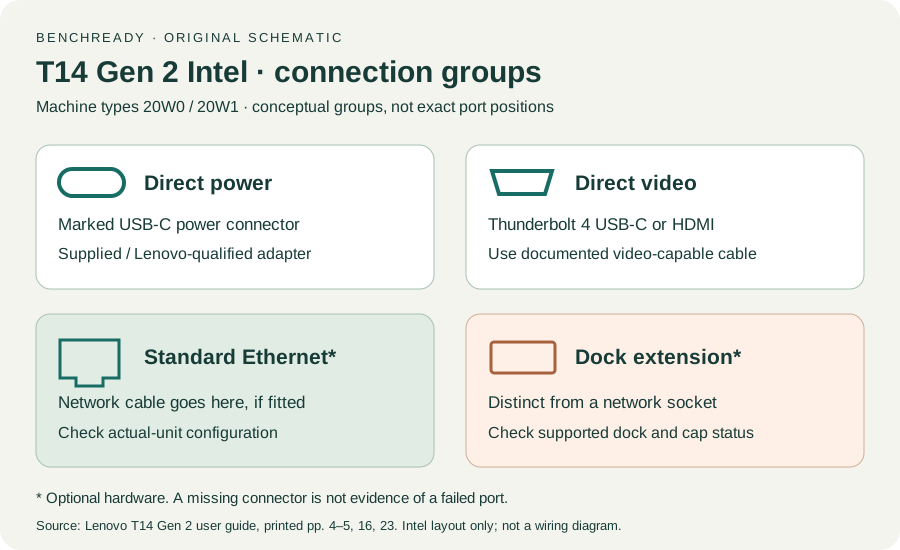
Printed pp. 1–5, 9–14, 16–19, 23–25, 27–33, 62, 65–67 · Checked 2026-10-13
Existing local official PDF/text reviewed for Intel layout, optional hardware, controls, Vantage, power and support
Reference only. Original paraphrase and observation worksheets; no copied images or manual pages.
Recovery key purpose / Backup methods · Checked 2026-10-13
Owner/IT recovery availability before hardware service; no key input
Reference only. Original paraphrase and observation worksheets; no copied images or manual pages.
Before recovery: back up data · Checked 2026-10-13
Backup before data-affecting work; original non-destructive sample check
Reference only. Original paraphrase and observation worksheets; no copied images or manual pages.
Original preparation workflow based on the linked documents. No hands-on device repair testing is claimed.