Battery drain: usage and recurring conditions
Open task Build a comparable app-use record before attributing short runtime to the battery.
Device evidence task · Pixel 7
Distinguish no visible power response from a phone that rings with a blank display.
Planning estimate for recording observations; excludes charging, backups, drying and service. Not a measured repair time.
Enable JavaScript to record observations. The complete preparation guide is available below.
Try holding Power for 5–7 seconds to start the Pixel. Record any battery graphic, startup logo or other visible response.
Source: Pixel will not charge or turn on · Turn on the device or hold Power
Use a known-working charging setup. Check after one minute; if charge may be very low, allow at least another 10 minutes before expecting screen startup.
Source: Pixel will not charge or turn on · Use a working charger; low-charge tip
If the screen stays blank, follow the charging article’s screen check: hold Power for about 35 seconds, then wait about 2 minutes. Stop if the phone restarts earlier.
Source: Pixel will not charge or turn on · Troubleshoot your screen, steps 1–2
Try one ordinary incoming call from another phone if available. Record audible ringing separately from what the caller hears; silent mode or no connection can make no-ring results inconclusive.
Source: Pixel will not charge or turn on · Troubleshoot your screen, step 3
Look closely for a very dim image without repeatedly pressing buttons. If it audibly rings but remains blank, Google directs authorized repair support.
Source: Pixel will not charge or turn on · Step 4; low brightness tip
Stop at the recorded response and raise backup/data access with support. The optional manual reset section of the source is outside this task.
Source: Pixel will not charge or turn on · When to contact support; reset data-loss warning
Charger/cable/outlet; Charge for 10 minutes; Troubleshoot screen · Checked 2026-10-13
Power-path comparison, low-charge wait and 35-second screen check
Reference only. Bounded original paraphrase and original schematics; no copied support images or pages.
Pixel 6 and later; Restart · Checked 2026-10-13
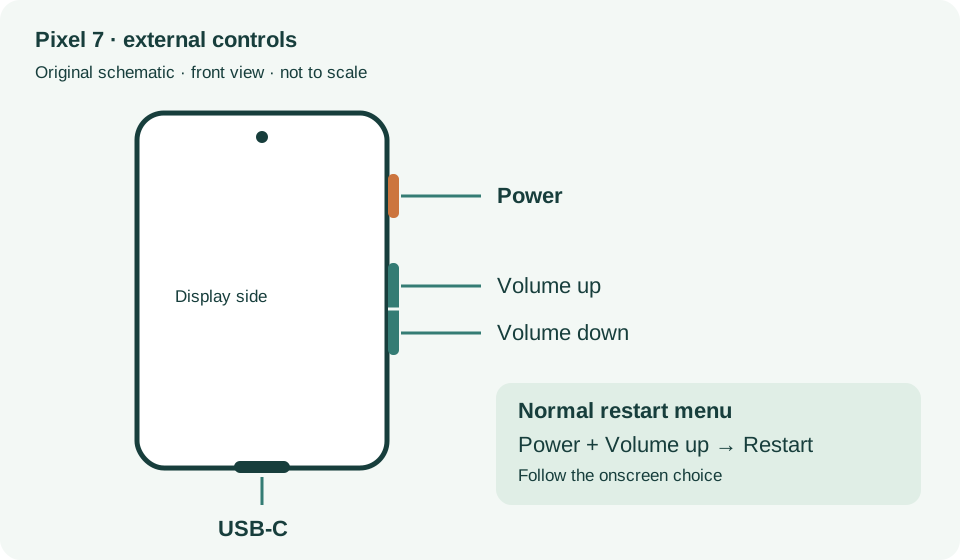
Power plus Volume up for Pixel 7 normal power menu
Reference only. Bounded original paraphrase and original schematics; no copied support images or pages.
Safety warnings; Repair and service; Charging · Checked 2026-10-13
Model-specific damaged-device and charging safety
Reference only. Bounded original paraphrase and original schematics; no copied support images or pages.
Learn how it works; Access; Exit · Checked 2026-10-13
Android 14 December 2023+, 2 GB, backups, possible reset and credential privacy
Reference only. Bounded original paraphrase and original schematics; no copied support images or pages.
Pixel 7 · Checked 2026-10-13
External power/volume controls and USB-C port
Reference only. Bounded original paraphrase and original schematics; no copied support images or pages.
Original preparation workflow based on the linked documents. No hands-on device repair testing is claimed.