Battery drain: usage and recurring conditions
Open task Build a comparable app-use record before attributing short runtime to the battery.
Device evidence task · Pixel 7
Compare one freezing, crashing or restarting symptom with downloaded apps temporarily disabled.
Planning estimate for recording observations; excludes charging, backups, drying and service. Not a measured repair time.
Enable JavaScript to record observations. The complete preparation guide is available below.
Choose one repeatable symptom in normal mode. Keep workload and network conditions in the record; a downloaded app unavailable in safe mode cannot be used as the same test.
Source: Find problem apps with safe mode · Problem apps: restarting, freezing, crashing, slow operation
Save work and note widget layout privately: some home-screen widgets can be removed by safe mode.
Source: Find problem apps with safe mode · Restart in safe mode: widget warning
On Pixel 7, hold Power + Volume up for the menu. Touch and hold Power off or Restart, then confirm OK.
Source: Find problem apps with safe mode · If phone is on: Pixel 6 and later
Verify Safe mode appears at the bottom of the screen. Airplane mode turns on automatically; turn it off when the chosen permitted comparison needs connectivity.
Source: Find problem apps with safe mode · Safe mode label; Airplane mode tip
Repeat the same built-in action. A changed result is a downloaded-app lead, while a short quiet period without the original trigger is inconclusive.
Source: Find problem apps with safe mode · Check if the problem goes away
Use Power + Volume up → Restart to return to normal mode and compare again. Discuss any app removal separately after protecting its data.
Source: Find problem apps with safe mode · Exit safe mode; check apps
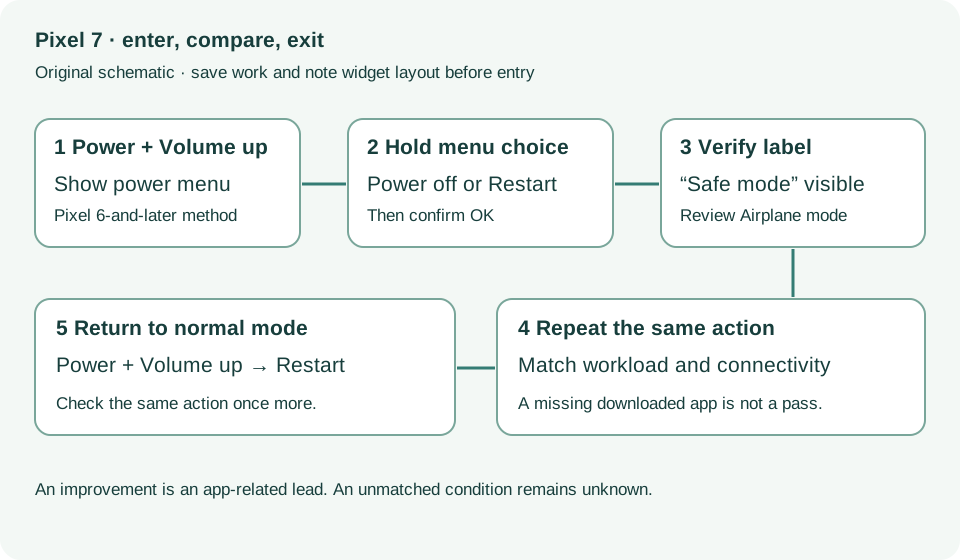
Restart in safe mode; Check problem; Exit · Checked 2026-10-13
Pixel 6-and-later entry, automatic Airplane mode and normal restart
Reference only. Bounded original paraphrase and original schematics; no copied support images or pages.
Pixel 6 and later; Restart · Checked 2026-10-13
Power plus Volume up for Pixel 7 normal power menu
Reference only. Bounded original paraphrase and original schematics; no copied support images or pages.
Safety warnings; Repair and service; Charging · Checked 2026-10-13
Model-specific damaged-device and charging safety
Reference only. Bounded original paraphrase and original schematics; no copied support images or pages.
Learn how it works; Access; Exit · Checked 2026-10-13
Android 14 December 2023+, 2 GB, backups, possible reset and credential privacy
Reference only. Bounded original paraphrase and original schematics; no copied support images or pages.
Original preparation workflow based on the linked documents. No hands-on device repair testing is claimed.