Pixel Camera: preview, capture and cache
Open task Compare front/rear capture in the Pixel Camera app before attributing a third-party app problem to hardware.
Service handoff pack · Pixel 7
Preserve lens, app and audio-route differences when several everyday functions seem unreliable.
Planning estimate for assembling existing evidence; excludes testing, backup and service.
Enable JavaScript to record observations. The complete preparation guide is available below.
Save observations in each relevant task. Return here to include their records in one export; untouched tasks remain “not started”.
Compare front/rear capture in the Pixel Camera app before attributing a third-party app problem to hardware.
Separate accessory discovery and connection from media and phone-audio profiles.
Verify the actual Repair Mode requirements and preserve data readiness before handing over a Pixel 7.
Make a comparable baseline: Use a clear intact lens and good lighting; a cracked lens stops cleaning. Use Pixel Camera for the camera comparison, then identify the affected preview. Confirm the intended accessory is connected and supports media audio.
Source: Fix Pixel Camera app; Fix Pixel Bluetooth problems; Use Pixel Repair Mode · Preparation pack synthesis of the linked manufacturer tasks; individual operations retain their task-specific source sections.
Collect the useful distinctions: Record cache-only clearing separately from a restart or app update. Keep personal photos and audio outside this report. Verify backup and Repair Mode requirements before handoff.
Source: Fix Pixel Camera app; Fix Pixel Bluetooth problems; Use Pixel Repair Mode · Preparation pack synthesis of the linked manufacturer tasks; individual operations retain their task-specific source sections.
Repeat the same conditions: Check the same preview and comfortable-volume audio route. Keep a camera fault and a pairing fault as separate observations. Document any missing accessory or unperformed comparison for the provider.
Source: Fix Pixel Camera app; Fix Pixel Bluetooth problems; Use Pixel Repair Mode · Preparation pack synthesis of the linked manufacturer tasks; individual operations retain their task-specific source sections.
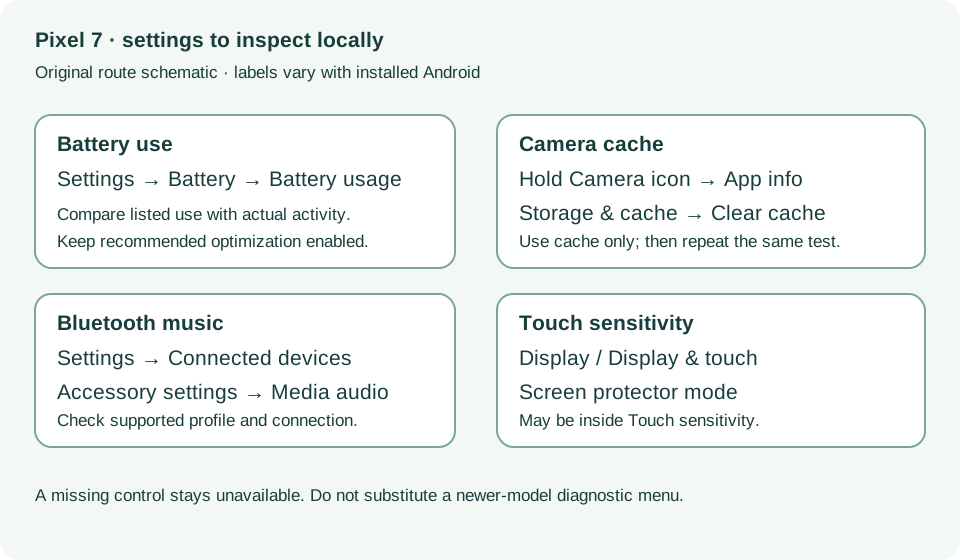
General troubleshooting steps 1–3; Selfie camera; Shutter delay · Checked 2026-10-13
Cache-only cleanup, camera comparisons and lighting
Reference only. Bounded original paraphrase and original schematics; no copied support images or pages.
Bluetooth basics; Cannot hear music; Cannot make or get calls · Checked 2026-10-13
Connected versus saved, media and phone audio profiles
Reference only. Bounded original paraphrase and original schematics; no copied support images or pages.
Learn how it works; Access; Exit · Checked 2026-10-13
Android 14 December 2023+, 2 GB, backups, possible reset and credential privacy
Reference only. Bounded original paraphrase and original schematics; no copied support images or pages.
Safety warnings; Repair and service; Charging · Checked 2026-10-13
Model-specific damaged-device and charging safety
Reference only. Bounded original paraphrase and original schematics; no copied support images or pages.
Original preparation workflow based on the linked documents. No hands-on device repair testing is claimed.