Sleep indicator and intermittent resume log
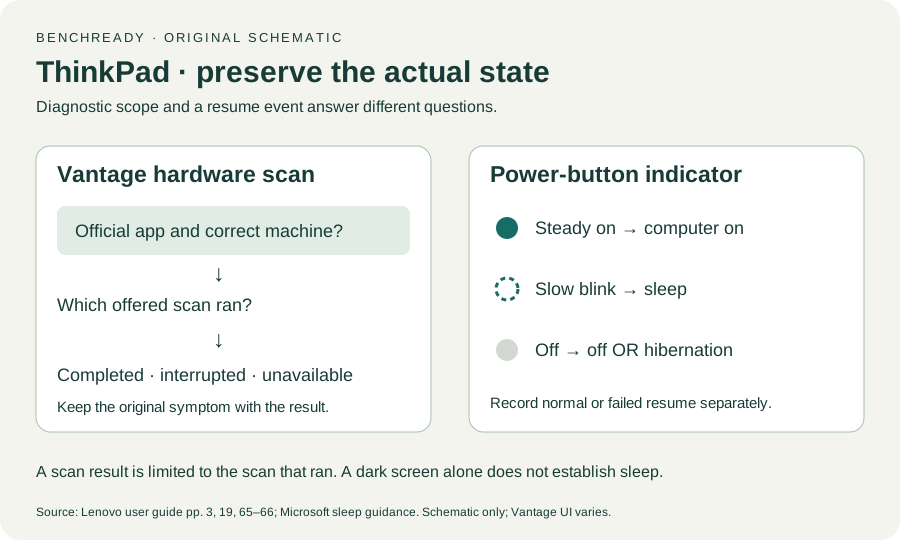
Open task Distinguish a dark display, a sleeping ThinkPad and a repeated resume failure.
Service handoff pack · ThinkPad T14 Gen 2 Intel
Record wake, pointing and sign-in conditions so intermittent faults stay visible through service.
Planning estimate for assembling existing evidence; excludes testing, backup and service.
Enable JavaScript to record observations. The complete preparation guide is available below.
Save observations in each relevant task. Return here to include their records in one export; untouched tasks remain “not started”.
Distinguish a dark display, a sleeping ThinkPad and a repeated resume failure.
Separate basic pointer failure from gesture/app limitations and disabled settings.
Identify which TrackPoint control is affected without removing keys or replacing the cap.
Compare an enrolled finger while keeping a working owner sign-in method available.
Combine verified backup coverage, private recovery access and reproducible complaint evidence.
Capture ordinary-use recurrences: Use the log during ordinary safe use; do not repeatedly force shutdowns to reproduce a fault. Record whether the issue follows wake, startup or active work. Compare Touchpad and TrackPoint without changing unrelated settings.
Source: ThinkPad T14 Gen 2 user guide; Back up your BitLocker recovery key; Recovery options in Windows · Preparation pack synthesis of the linked manufacturer tasks; individual operations retain their task-specific source sections.
Preserve access: Keep a valid private alternate sign-in method before investigating a fingerprint symptom. Back up accessible files and verify owner/IT recovery access. Never add passwords, recovery keys or biometric data to the report.
Source: ThinkPad T14 Gen 2 user guide; Back up your BitLocker recovery key; Recovery options in Windows · Preparation pack synthesis of the linked manufacturer tasks; individual operations retain their task-specific source sections.
Show the intermittent pattern: Send the provider observed condition/result pairs and untouched unknown items. Include whether a normal restart changed the symptom if actually observed. Ask for a return check using the same ordinary-use condition.
Source: ThinkPad T14 Gen 2 user guide; Back up your BitLocker recovery key; Recovery options in Windows · Preparation pack synthesis of the linked manufacturer tasks; individual operations retain their task-specific source sections.
Continue the observation: Review the service summary and verify safe normal operation. Record a later recurrence even when one test passed. Keep the backup and alternate access until the return review is complete.
Source: ThinkPad T14 Gen 2 user guide; Back up your BitLocker recovery key; Recovery options in Windows · Preparation pack synthesis of the linked manufacturer tasks; individual operations retain their task-specific source sections.
Printed pp. 1–5, 9–14, 16–19, 23–25, 27–33, 62, 65–67 · Checked 2026-10-13
Existing local official PDF/text reviewed for Intel layout, optional hardware, controls, Vantage, power and support
Reference only. Original paraphrase and observation worksheets; no copied images or manual pages.
Recovery key purpose / Backup methods · Checked 2026-10-13
Owner/IT recovery availability before hardware service; no key input
Reference only. Original paraphrase and observation worksheets; no copied images or manual pages.
Before recovery: back up data · Checked 2026-10-13
Backup before data-affecting work; original non-destructive sample check
Reference only. Original paraphrase and observation worksheets; no copied images or manual pages.
Original preparation workflow based on the linked documents. No hands-on device repair testing is claimed.