Touch response across surface and accessories
Open task Compare the same touch action with a dry screen, no cable and removable coverings removed.
Device evidence task · iPhone 13
Prepare a capture-path comparison when other people cannot hear you clearly.
Planning estimate for recording observations; excludes charging, backups, drying and service. Not a measured repair time.
Enable JavaScript to record observations. The complete preparation guide is available below.
Remove a removable case or film obstructing microphone openings. Inspect only accessible surfaces; embedded debris or damage belongs with a provider.
Source: If the microphones on your iPhone are not working · Clear the microphones
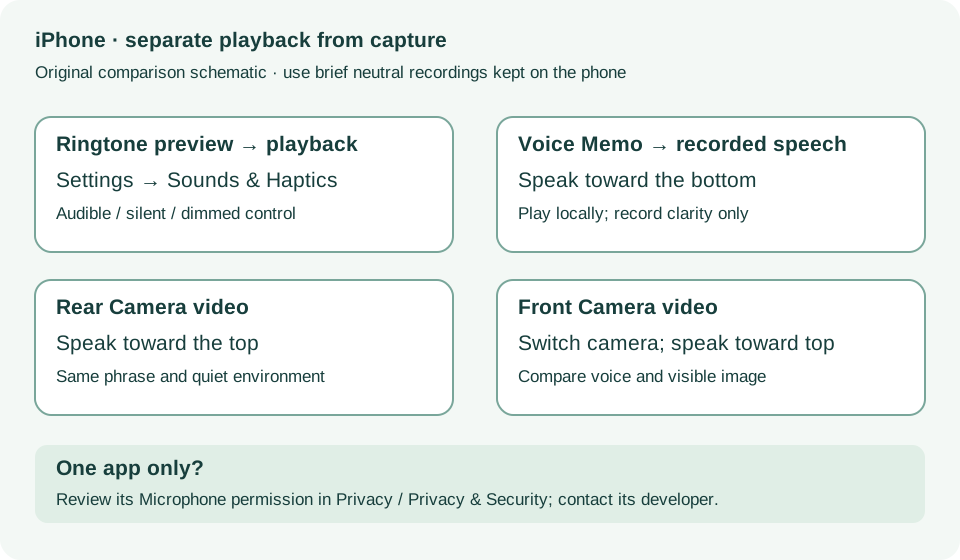
Record a short neutral phrase in Voice Memos while speaking toward the bottom of the phone. Play it locally and record clarity only.
Source: If the microphones on your iPhone are not working · If people cannot hear you on calls
In Camera, record a short video while speaking toward the top of the phone. Check the voice locally.
Source: If the microphones on your iPhone are not working · Speakerphone: record video
Switch to the other camera and repeat with the same phrase and speaking position. Compare both recordings without uploading them.
Source: If the microphones on your iPhone are not working · Speakerphone: switch cameras and compare
If only one app fails, inspect its Microphone permission under Settings → Privacy & Security, or the equivalent Privacy menu on older iOS. If permission is present but the app fails, contact its developer.
Source: If the microphones on your iPhone are not working · Microphone does not work in a specific app
Phone calls; Speakerphone; Specific app · Checked 2026-10-13
Voice Memos, two camera recordings and microphone permissions
Reference only. Bounded original paraphrase and original schematics; no copied support images or pages.
Handling; Repairing; Battery; Charging · Checked 2026-10-13
Stop use for suspected damage and use trained battery service
Reference only. Bounded original paraphrase and original schematics; no copied support images or pages.
Find the model name / iPhone 13 · Checked 2026-10-04
Model confirmation
Reference only. Original paraphrase; no copied images or manual pages.
External Buttons and Connectors; Power and Battery · Checked 2026-10-13
Lightning, physical controls and wireless charging applicability
Reference only. Bounded original paraphrase and original schematics; no copied support images or pages.
Get ready; Bring in; Get back from service · Checked 2026-10-13
Backup, OS-specific service readiness, credential privacy and returned-device data
Reference only. Bounded original paraphrase and original schematics; no copied support images or pages.
Troubleshoot your speaker, steps 1–7 · Checked 2026-10-13
Silent switch, Focus, speaker openings, ringtone and call comparisons
Reference only. Bounded original paraphrase and original schematics; no copied support images or pages.
Remove case/accessory/film; More steps; Get service · Checked 2026-10-13
Front/rear camera and flashlight comparisons
Reference only. Bounded original paraphrase and original schematics; no copied support images or pages.
Original preparation workflow based on the linked documents. No hands-on device repair testing is claimed.