Battery drain: usage and recurring conditions
Open task Build a comparable app-use record before attributing short runtime to the battery.
Device evidence task · Pixel 7
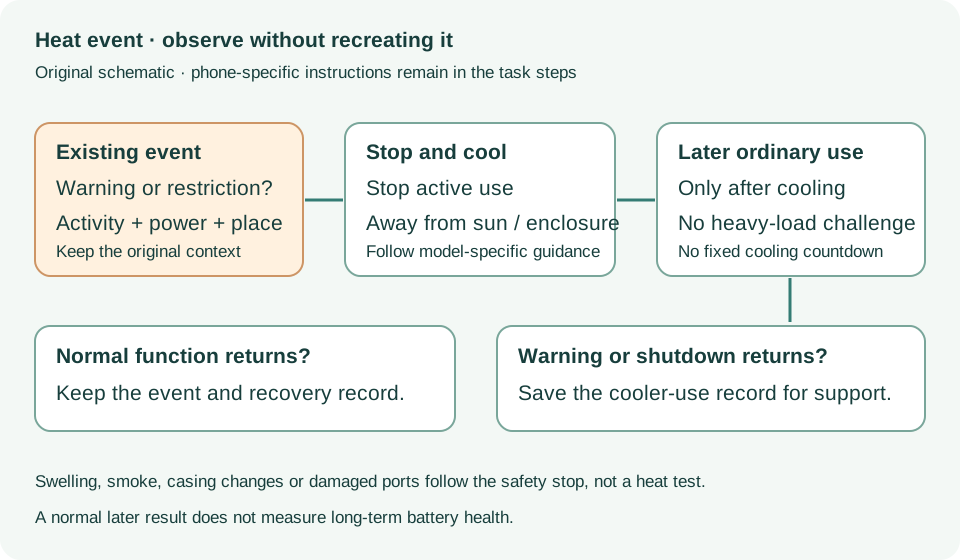
Document naturally occurring heat restrictions or shutdowns and the safe later result.
Planning estimate for recording observations; excludes charging, backups, drying and service. Not a measured repair time.
Enable JavaScript to record observations. The complete preparation guide is available below.
Record the observed restriction: slowed charging, disabled camera/flash, connectivity restriction, warning or shutdown. Do not infer a temperature from touch alone.
Source: Help keep Pixel from getting too warm · How your phone protects itself
Choose the activity already in progress, such as camera, navigation, hotspot, setup or charging. Keep sun or enclosed-space exposure as a separate condition.
Source: Help keep Pixel from getting too warm · Warm activities; Keep phone from getting too hot
If too hot, disconnect power when safe, move to a cooler place and stop using it until cooled. If it shut down, let it cool before restarting.
Source: Help keep Pixel from getting too warm · What to do if too hot; protective shutdown
After cooling, look for Battery → Battery diagnostics → Phone is very warm. The source lists Pixel 6 and later, but if this installed OS lacks the option, record unavailable.
Source: Help keep Pixel from getting too warm · Check device temperature
Observe ordinary cooler use without recreating heavy load. Recurring shutdowns or unexplained restrictions should go to Google with workload and charging context.
Source: Help keep Pixel from getting too warm · Continued shutdown: contact Pixel support
Temperature; How phone protects itself; Too hot · Checked 2026-10-13
Cool-down response and recurring shutdown escalation
Reference only. Bounded original paraphrase and original schematics; no copied support images or pages.
Battery diagnostics; Battery usage; Updates; Still have issues · Checked 2026-10-13
App-use review, optimization and post-update context
Reference only. Bounded original paraphrase and original schematics; no copied support images or pages.
Safety warnings; Repair and service; Charging · Checked 2026-10-13
Model-specific damaged-device and charging safety
Reference only. Bounded original paraphrase and original schematics; no copied support images or pages.
Learn how it works; Access; Exit · Checked 2026-10-13
Android 14 December 2023+, 2 GB, backups, possible reset and credential privacy
Reference only. Bounded original paraphrase and original schematics; no copied support images or pages.
Device gets too warm; Charging On Hold; Temperature warning · Checked 2026-10-13
Cooling and temperature-related charging/display restrictions
Reference only. Bounded original paraphrase and original schematics; no copied support images or pages.
Original preparation workflow based on the linked documents. No hands-on device repair testing is claimed.