Battery drain: usage and recurring conditions
Open task Build a comparable app-use record before attributing short runtime to the battery.
Device evidence task · Pixel 7
Compare the Pixel and a second device across permitted networks without resetting network settings.
Planning estimate for recording observations; excludes charging, backups, drying and service. Not a measured repair time.
Enable JavaScript to record observations. The complete preparation guide is available below.
Open Settings → Network & internet → Internet. Check Wi-Fi and Airplane mode, then toggle Wi-Fi off/on if appropriate. Keep network identities private.
Source: Fix Pixel Wi-Fi connection problems · Check settings; Network & internet → Internet
After joining, open one ordinary webpage. Record a joined Wi-Fi network separately from working internet access.
Source: Fix Pixel Wi-Fi connection problems · Identify the connection issue: Internet
Try the same page from another permitted device on the same network. Shared failure is evidence for the network owner or ISP.
Source: Fix Pixel Wi-Fi connection problems · Identify issue: Phone
If available, test the Pixel on another trusted working network. A failure limited to one network needs that network’s support first.
Source: Fix Pixel Wi-Fi connection problems · Identify issue: Network
Restart normally using Power + Volume up → Restart and compare the usual network again. A later safe-mode comparison is available in its own task if an app may interfere.
Source: Turn your Pixel phone on and off · Restart: Pixel 6 and later
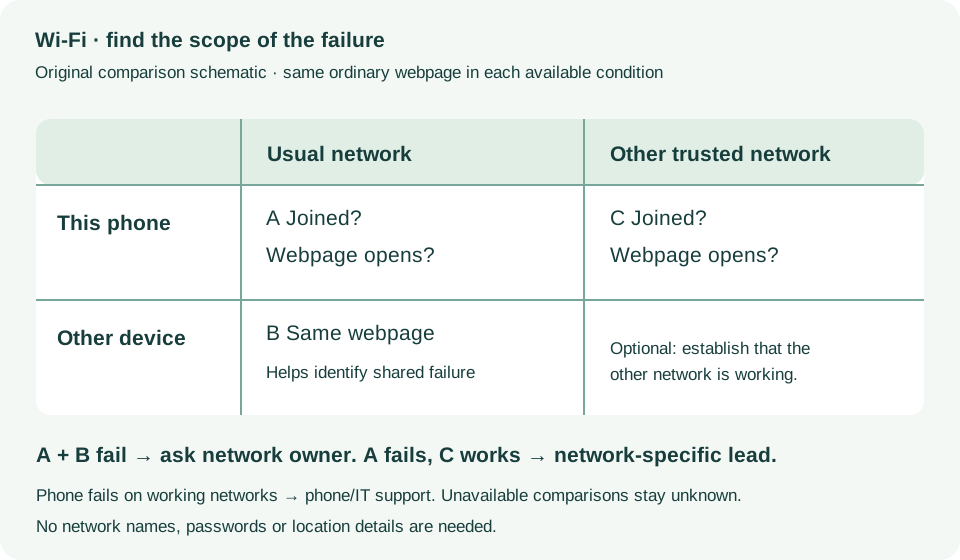
Check settings; Identify connection issue; Problem apps · Checked 2026-10-13
Phone versus network/internet comparison; excludes Pixel 11-only diagnostics
Reference only. Bounded original paraphrase and original schematics; no copied support images or pages.
Pixel 6 and later; Restart · Checked 2026-10-13
Power plus Volume up for Pixel 7 normal power menu
Reference only. Bounded original paraphrase and original schematics; no copied support images or pages.
Restart in safe mode; Check problem; Exit · Checked 2026-10-13
Pixel 6-and-later entry, automatic Airplane mode and normal restart
Reference only. Bounded original paraphrase and original schematics; no copied support images or pages.
Safety warnings; Repair and service; Charging · Checked 2026-10-13
Model-specific damaged-device and charging safety
Reference only. Bounded original paraphrase and original schematics; no copied support images or pages.
Learn how it works; Access; Exit · Checked 2026-10-13
Android 14 December 2023+, 2 GB, backups, possible reset and credential privacy
Reference only. Bounded original paraphrase and original schematics; no copied support images or pages.
Check Wi-Fi settings; Verify router; Get more help · Checked 2026-10-13
Association versus internet and device/network comparisons
Reference only. Bounded original paraphrase and original schematics; no copied support images or pages.
Original preparation workflow based on the linked documents. No hands-on device repair testing is claimed.